Hello Sitecorian Community,
If you’ve been working on Sitecore projects over the last few years, you’ve probably seen this situation at some point:
“We have XM Cloud for content, CDP for customer data, Personalize for targeting, and Content Hub for assets — but our team spends half the day switching between four different portals.”
And honestly, that was the reality for most enterprise Sitecore projects. Different logins. Different APIs. Different billing conversations. Developers writing integration glue between products that were supposed to talk to each other.
At Sitecore Symposium 2025 in Orlando, Sitecore announced SitecoreAI — and on November 10, 2025, every XM Cloud tenant was automatically upgraded. No migration. No new contract required.
Let me walk through what actually changed, and what it means for teams building on Sitecore right now.
What Is SitecoreAI, Really?
The simplest way to say it:
SitecoreAI is XM Cloud + CDP + Personalize + Search + Content Hub — all unified into one platform, one login, one data model, with AI built into every layer.
Sitecore calls this shift going from “composable” to “composed.” The flexibility is still there underneath. But the friction between products is significantly reduced on top.
Before vs. After
❌ Before (XM Cloud era)
- 4 separate portals, 4 logins
- Token-based AI billing surprises
- Separate contracts for each product
- Sitecore Stream was a separate add-on
- “You can’t customise SaaS”
✅ After (SitecoreAI)
- One unified workspace, one login
- No token billing — one metric per module*
- Buy one module, access the full suite
- Brand-aware AI copilot baked in
- Sitecore Studio — governed extensibility
* Sitecore COO Dave Tilbury on stage at Symposium: “no addons, no upsells, no tokens, no games.” Pricing shifts to one metric per module — e.g. requests for CMS, profiles for CDP. Source: Sitecore Developer Portal FAQ.
What Stays the Same for Developers
This is probably the most important thing for teams who are mid-project:
- Your JSS setup is unchanged
- Your Sitecore CLI and serialization workflows carry over
- The Deploy App pipeline works exactly the same
- All existing SDK integrations continue without breaking changes
The platform adds new capabilities on top. It doesn’t remove what was already working.
⚠️ One thing to watch: Content Hub integration into SitecoreAI is being phased through 2026. If your project depends heavily on Content Hub DAM workflows, check the Sitecore changelog regularly and build with loose coupling where Content Hub is involved.
Sitecore Studio — The Part That Changes Daily Workflows
If SitecoreAI is the platform, Sitecore Studio is where we actually build and extend things. It has four parts:
- Agentic Studio — build and run AI agents and multi-step flows
- App Studio — build and package custom extensions and apps
- Sitecore Connect — pre-built connectors (Salesforce, OpenAI, Gemini, etc.)
- Marketplace — discover and publish community-built agents and apps
Agentic Studio — Four Concepts You Need to Know First
Everything in Agentic Studio is built around four things. Understanding these before you start building will save a lot of confusion:
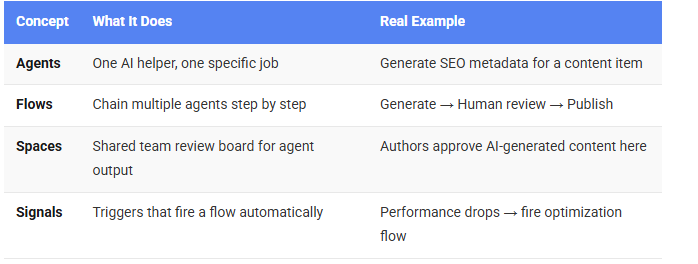
A Real Use Case: Bulk SEO Metadata Generation
Here is a situation we came across recently. A client had 600 product pages that needed SEO titles, descriptions, and keywords updated before a Monday go-live. Previously, this would mean a custom PowerShell pipeline and a lot of manual effort.
With Agentic Studio, here is how the flow looks:
Step 1 — Create the Agent
In Agentic Studio, create a new agent with one clear purpose: “Generate SEO metadata for a given page item.” Keep the scope narrow. One agent = one job. This gives you consistent, predictable output.
Step 2 — Add Brand Context
Upload the client’s brand guidelines document as RAG context for the agent. Sitecore Stream uses this to ground the AI generation. The output then sounds like the client’s actual brand voice — not generic AI copy.
Step 3 — Add a Human Review Step
Connect the agent to a Spaces review step before any publish action. This is not optional in enterprise setups. When a stakeholder asks “who approved that AI-written content?” — you need to point to an actual approval record.
Bulk content trigger (query content tree)
   ↓
[Agent: Generate SEO Metadata]
   ↓
[Spaces: Author Review Board]
   ↓  (on approval)
[Publish to Experience Edge]
Step 4 — Run It Overnight
Attach a bulk trigger to the flow with a content tree query. 600 pages queue through the agent overnight. Monday morning, the review board has everything waiting. Authors approve or edit, then publish. The weekend is saved.
App Studio — For Developers Specifically
While Agentic Studio is for building flows, App Studio is where developers build the underlying extensions — custom connectors, UI plugins, packaged apps that extend the platform.
Think of it as the modern replacement for custom pipelines and processor chains, but built as versioned, deployable, shareable apps. If you have a Helix background, the pattern feels familiar — bounded modules, clear interfaces, single responsibility. The deployment model is SaaS-native instead of server-side, but the discipline translates directly.
Before You Demo — Set Up Permissions First
One thing we learned early: configure role-based permissions in Sitecore Studio before showing it to a client. Studio uses the same permission model as the rest of SitecoreAI. You can control who creates agents, who deploys flows, who can modify a live workflow.
The question “can someone accidentally publish AI content to production?” will always come up. Having the answer ready — and demonstrating the controls — builds a lot of confidence.
Why This Matters for Our Teams
Before SitecoreAI:
- Bulk content operations needed custom PowerShell scripts
- AI generation required external tooling and custom pipelines
- No governed way to build reusable AI workflows inside the platform
After SitecoreAI:
- Agents handle bulk operations with a structured flow
- Brand-aware generation is built into the authoring environment
- App Studio gives developers a governed way to build and ship extensions
Final Thoughts
SitecoreAI is not just a name change. It is a genuine platform shift that changes how teams work day to day — from how content is created, to how integrations are built, to how AI automation fits into existing workflows.
The good news for teams mid-project: your existing toolchain is unchanged. You can start exploring Studio incrementally without disrupting what is already in flight.
If you are starting a new project, I would recommend spending a sprint early just exploring Agentic Studio. Build one simple agent, run it through a flow with a review step, and see where it fits in your client’s content operations. That early spike will shape how you scope the rest of the project.
Stay tuned for more Sitecore-related articles, tips, and tricks to enhance your Sitecore experience.
Till then, happy Sitecoring! 😊
Please leave your comments or share this article if it’s useful for you!
No comments:
Post a Comment