Showing posts with label sitecorepowershell. Show all posts

Saturday, April 4, 2026

Cleaning Up Sitecore Versions at Scale: A Practical PowerShell Approach


Hello Sitecorian Community,

If you’ve worked on a large Sitecore implementation, you’ve probably seen this happen:

Items with 10, 20, sometimes even 50+ versions sitting in the system.

At first, it doesn’t seem like a big deal. But over time:

  • Content trees become heavier
  • Database size increases
  • Performance can degrade
  • Content management becomes harder

And eventually, the question comes up:

How do we safely clean up old versions without breaking anything?

The Real Problem

In enterprise setups (like ours managing hundreds of websites), version sprawl is very common.

Typical scenarios:

  • Frequent content updates create multiple versions
  • Publishing pipelines don’t remove old versions
  • Editors rarely clean up older versions manually
  • Multiple languages multiply the problem

Manually deleting versions is not scalable and also risky.

What We Needed

We wanted a solution that:

  • Works recursively across content trees
  • Supports all languages
  • Keeps only the relevant versions
  • Deletes only safe-to-remove versions
  • Can run in dry-run mode before actual cleanup

Two Cleanup Strategies We Implemented

We ended up building two PowerShell scripts using Sitecore PowerShell Extensions (SPE) depending on the use case.

1️⃣ Basic Cleanup: Keep Latest 3 Versions

This is the simplest and most commonly used approach.

Behavior

For an item with versions:

10, 9, 8, 7, 6

The script will:

  • Keep → 10, 9, 8
  • Delete → 7, 6

If an item has 3 or fewer versions, it is skipped.

When to Use

  • General cleanup
  • Non-workflow-driven environments
  • Quick version reduction across large trees

Core Logic

$allVersions = Get-Item -Path $itemPath -Language $language -Version * |
Sort-Object { [int]$_.Version.Number } -Descending
$versionsToKeep = $allVersions | Select-Object -First 3
$versionsToDelete = $allVersions | Select-Object -Skip 3
foreach ($oldVersion in $versionsToDelete) {
$oldVersion.Versions.RemoveVersion()
}

2️⃣ Smart Cleanup: Keep Latest 3 Approved Versions

This is a workflow-aware cleanup, which is much safer for content-heavy environments.

Behavior

Example:

Versions:
10, 9, 8, 7, 6, 5, 4, 3, 2, 1

Case 1

Approved versions: 10, 9, 8
→ Keep: 10, 9, 8
→ Delete: everything else

Case 2

Approved versions: 10, 9, 7
→ Keep: 10, 9, 7
→ Delete: 8, 6, 5, 4, 3, 2, 1

Case 3

Approved versions: 10, 7
→ Skip (not enough approved versions)

Key Implementation Details

๐Ÿ” Recursive Execution

The script runs across:

  • Root item
  • All children
  • All descendants

๐ŸŒ Multi-language Support

Each language version is processed independently.

๐Ÿงช Dry Run Mode

Always start with:

$dryRun = $true

Then switch to:

$dryRun = $false

GitHub Repository

You can find both scripts here:

It includes:

  • Basic version cleanup script
  • Workflow-based cleanup script
  • Safe dry-run execution

Why This Helped Us

Before this:

  • Version cleanup was manual and inconsistent
  • Content trees became bloated
  • Investigations were harder

After this:

  • Cleanup became automated and safe
  • We reduced unnecessary versions significantly
  • Improved overall content hygiene

When Should You Run This?

  • After large deployments
  • As part of regular maintenance jobs
  • During performance optimization
  • Before database cleanup activities

Reference screenshot:


Final Thoughts

In large Sitecore environments, version management is often overlooked, but it plays a big role in performance and maintainability.

These scripts helped us:

  • Keep content clean
  • Reduce noise in version history
  • Maintain only what actually matters

If you’re dealing with version-heavy content trees, this approach can save a lot of time and effort.

Stay tuned for more Sitecore-related articles, tips, and tricks to enhance your Sitecore experience.

Till then, happy Sitecoring! ๐Ÿ˜Š

Please leave your comments or share this article if it’s useful for you!
Monday, March 16, 2026

Debugging Sitecore Publishing Issues at Scale: A Simple PowerShell Tool That Saved Our Team Hours

Hello Sitecorian Community,

If you’ve worked with Sitecore in a large multi-site environment, you’ve probably faced this situation.

Someone reports:

“The content is updated in CMS but not visible on the website.”

And the investigation begins.

You start checking:

  • Is the item published?
  • Does it exist in the web database?
  • Is the revision updated?
  • Did the child items publish?
  • Is it a language version issue?

Now imagine doing this when you manage 300+ websites and hundreds of items move across environments every day.

That’s the reality our team deals with.

The Real Problem

Publishing issues in Sitecore are rarely obvious.

Sometimes:

  • The item exists in master but not in web
  • The item exists in both but revision IDs don’t match
  • The updated date differs
  • Only the parent item published, but children didn’t
  • Deployment pipelines move items but something silently fails

When troubleshooting these issues manually, developers often:

  1. Open master database
  2. Inspect the item
  3. Switch to web database
  4. Check again
  5. Compare Revision IDs
  6. Repeat for multiple items or entire trees

Doing this repeatedly across dozens (or hundreds) of items quickly becomes slow, frustrating, and error-prone.

Our Daily Reality

Our platform supports 300+ websites, and content changes constantly move between databases and environments.

During deployments or publishing validations, the most common question is:

Did the content actually publish correctly?

Finding that answer quickly is critical for developers, QA teams, and support engineers.

The Tool We Built

To simplify this process, we built a Sitecore PowerShell Extensions (SPE) script that compares items between two databases.

We call it:

Sitecore Publishing Validation Tool

GitHub Repository (script available here):
https://github.com/gaurarun777/SitecorePowerShell/blob/main/2026/sitecore-publishing-validation-tool.ps1

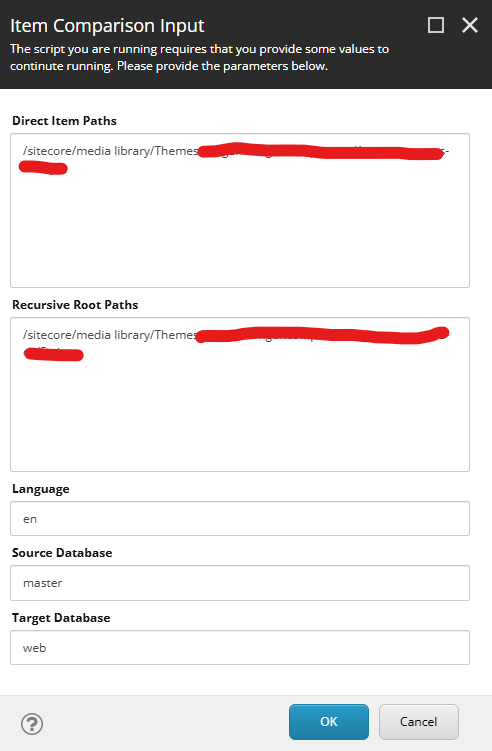
This script allows developers to:

  • Provide specific item paths
  • Provide root paths for recursive validation
  • Compare two databases (for example master vs web)
  • Validate Revision ID
  • Validate Updated Date
  • Detect missing or mismatched items

Instead of manually switching between databases, the script produces a comparison grid instantly.

The PowerShell Script

Below is the core idea behind the script used in our Sitecore environment.

# Simplified comparison logic
$sourceItem = Get-Item "${sourceDatabase}:$path" -Language $language
$targetItem = Get-Item "${targetDatabase}:$path" -Language $language
$sourceRevision = $sourceItem["__Revision"]
$targetRevision = $targetItem["__Revision"]
$sourceUpdated = $sourceItem["__Updated"]
$targetUpdated = $targetItem["__Updated"]
if ($sourceRevision -ne $targetRevision) {
$status = "Revision Mismatch"
}
elseif ($sourceUpdated -ne $targetUpdated) {
$status = "Updated Date Mismatch"
}
else {
$status = "Match"
}

The script loops through item paths and recursively scans content trees to validate publishing results between databases.

Developers can then quickly identify:

  • Items that failed to publish
  • Items with outdated revisions
  • Missing items in the target database
  • Partial publishing issues within item trees

What the Output Looks Like

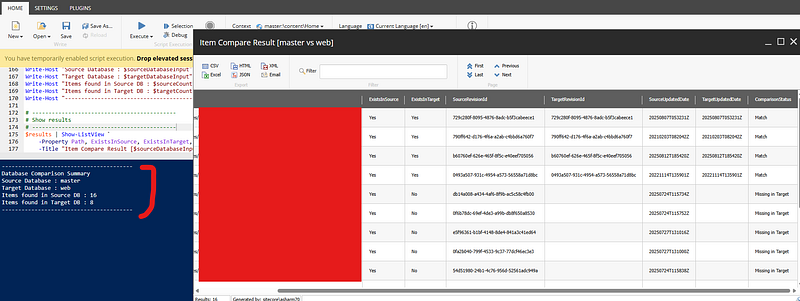
The script generates a comparison grid showing:

  • Item Path
  • Exists in Source DB
  • Exists in Target DB
  • Source Revision ID
  • Target Revision ID
  • Updated Dates
  • Comparison Status

Example statuses:

  • Match
  • Revision Mismatch
  • Updated Date Mismatch
  • Missing in Target
  • Missing in Source

This makes it extremely easy to spot publishing issues.

Why This Helped Our Team

Before using this tool:

  • Troubleshooting publishing issues could take 30–60 minutes
  • Developers had to manually inspect each item
  • Recursive tree validation was tedious

Now:

  1. Paste item paths
  2. Select databases
  3. Run the script

Within seconds we can see exactly where publishing failed.

Why Sitecore PowerShell Extensions Is So Powerful

One thing I really appreciate about Sitecore PowerShell Extensions is how quickly developers can build practical operational tools.

With a few lines of PowerShell, you can automate tasks that would otherwise take significant manual effort.

SPE is extremely useful for:

  • Content validation
  • Publishing verification
  • Bulk content operations
  • Content audits
  • Operational automation

Final Thoughts

When working with large Sitecore implementations, operational tooling becomes just as important as development.

Sometimes the biggest productivity improvements come from small internal tools that solve daily problems.

This publishing validation script became one of those tools for our team.

If you manage a large Sitecore environment, I highly recommend building small utilities with Sitecore PowerShell Extensions to simplify repetitive tasks.

They might save your team more time than you expect.

Reference Screesnhots:


If you’re interested in trying the script, you can find it here:

GitHub:
https://github.com/gaurarun777/SitecorePowerShell/blob/main/2026/sitecore-publishing-validation-tool.ps1

Would love to hear what internal tools or automation scripts your Sitecore teams are using to improve daily operations.

Stay tuned for more Sitecore-related articles, tips, and tricks to enhance your Sitecore experience.

Till then, happy Sitecoring! ๐Ÿ˜Š

Please leave your comments or share this article if it’s useful for you!