Hello Sitecorian Community,
If you’ve worked with Sitecore in a large multi-site environment, you’ve probably faced this situation.
Someone reports:
“The content is updated in CMS but not visible on the website.”
And the investigation begins.
You start checking:
- Is the item published?
- Does it exist in the web database?
- Is the revision updated?
- Did the child items publish?
- Is it a language version issue?
Now imagine doing this when you manage 300+ websites and hundreds of items move across environments every day.
That’s the reality our team deals with.
The Real Problem
Publishing issues in Sitecore are rarely obvious.
Sometimes:
- The item exists in master but not in web
- The item exists in both but revision IDs don’t match
- The updated date differs
- Only the parent item published, but children didn’t
- Deployment pipelines move items but something silently fails
When troubleshooting these issues manually, developers often:
- Open master database
- Inspect the item
- Switch to web database
- Check again
- Compare Revision IDs
- Repeat for multiple items or entire trees
Doing this repeatedly across dozens (or hundreds) of items quickly becomes slow, frustrating, and error-prone.
Our Daily Reality
Our platform supports 300+ websites, and content changes constantly move between databases and environments.
During deployments or publishing validations, the most common question is:
Did the content actually publish correctly?
Finding that answer quickly is critical for developers, QA teams, and support engineers.
The Tool We Built
To simplify this process, we built a Sitecore PowerShell Extensions (SPE) script that compares items between two databases.
We call it:
Sitecore Publishing Validation Tool
GitHub Repository (script available here):
https://github.com/gaurarun777/SitecorePowerShell/blob/main/2026/sitecore-publishing-validation-tool.ps1
This script allows developers to:
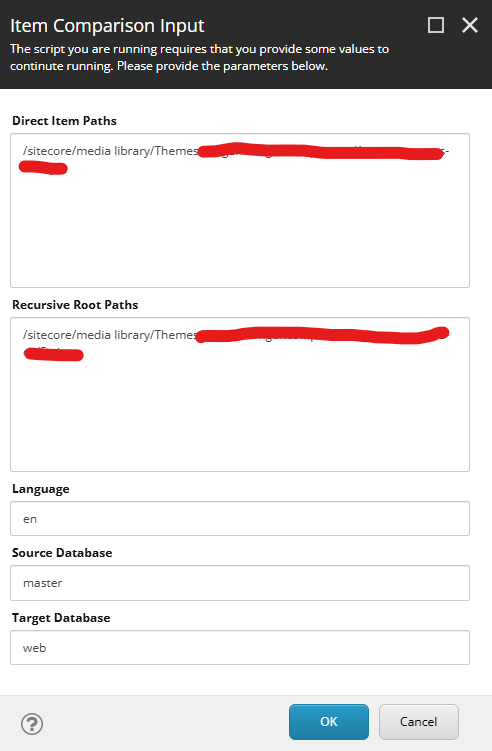
- Provide specific item paths
- Provide root paths for recursive validation
- Compare two databases (for example
mastervsweb) - Validate Revision ID
- Validate Updated Date
- Detect missing or mismatched items
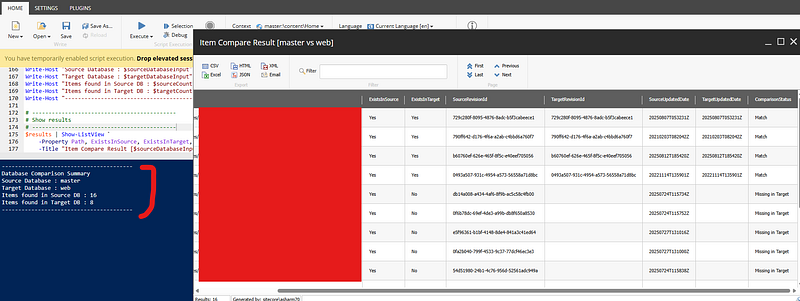
Instead of manually switching between databases, the script produces a comparison grid instantly.
The PowerShell Script
Below is the core idea behind the script used in our Sitecore environment.
# Simplified comparison logic
$sourceItem = Get-Item "${sourceDatabase}:$path" -Language $language
$targetItem = Get-Item "${targetDatabase}:$path" -Language $language
$sourceRevision = $sourceItem["__Revision"]
$targetRevision = $targetItem["__Revision"]
$sourceUpdated = $sourceItem["__Updated"]
$targetUpdated = $targetItem["__Updated"]
if ($sourceRevision -ne $targetRevision) {
    $status = "Revision Mismatch"
}
elseif ($sourceUpdated -ne $targetUpdated) {
    $status = "Updated Date Mismatch"
}
else {
    $status = "Match"
}
The script loops through item paths and recursively scans content trees to validate publishing results between databases.
Developers can then quickly identify:
- Items that failed to publish
- Items with outdated revisions
- Missing items in the target database
- Partial publishing issues within item trees
What the Output Looks Like
The script generates a comparison grid showing:
- Item Path
- Exists in Source DB
- Exists in Target DB
- Source Revision ID
- Target Revision ID
- Updated Dates
- Comparison Status
Example statuses:
- Match
- Revision Mismatch
- Updated Date Mismatch
- Missing in Target
- Missing in Source
This makes it extremely easy to spot publishing issues.
Why This Helped Our Team
Before using this tool:
- Troubleshooting publishing issues could take 30–60 minutes
- Developers had to manually inspect each item
- Recursive tree validation was tedious
Now:
- Paste item paths
- Select databases
- Run the script
Within seconds we can see exactly where publishing failed.
Why Sitecore PowerShell Extensions Is So Powerful
One thing I really appreciate about Sitecore PowerShell Extensions is how quickly developers can build practical operational tools.
With a few lines of PowerShell, you can automate tasks that would otherwise take significant manual effort.
SPE is extremely useful for:
- Content validation
- Publishing verification
- Bulk content operations
- Content audits
- Operational automation
Final Thoughts
When working with large Sitecore implementations, operational tooling becomes just as important as development.
Sometimes the biggest productivity improvements come from small internal tools that solve daily problems.
This publishing validation script became one of those tools for our team.
If you manage a large Sitecore environment, I highly recommend building small utilities with Sitecore PowerShell Extensions to simplify repetitive tasks.
They might save your team more time than you expect.
Reference Screesnhots:
If you’re interested in trying the script, you can find it here:
Would love to hear what internal tools or automation scripts your Sitecore teams are using to improve daily operations.
Stay tuned for more Sitecore-related articles, tips, and tricks to enhance your Sitecore experience.
Till then, happy Sitecoring! 😊
Please leave your comments or share this article if it’s useful for you!
No comments:
Post a Comment