Hello Sitecorian Community,
In large SXA implementations, operational issues rarely affect just one site. In our case, we were working on a Sitecore 10.4 SXA solution with 300+ websites, and we encountered a performance concern:
The sitemap refresh job was executing more frequently than expected.
To properly investigate the issue, we first needed visibility.
Specifically, we needed to answer:
- How many sites actually have a Sitemap item?
- What values are configured for:
- Refresh Threshold
- Cache Type
- Cache Expiration
- Are there inconsistencies across tenants and sites?
Manually checking 300+ sites was not realistic. Automation was the only viable approach.
Understanding the SXA Structure
In SXA, the typical structure looks like this:
/sitecore/content/{Tenant}/{Tenant}/{Site}/Settings/Sitemap
The configuration fields we were interested in are stored directly on the Sitemap item under the Settings node.
The required fields:
- Refresh Threshold
- Cache Type
- Cache Expiration
Our goal was to extract:
- Sitemap item path
- Configured values of the three fields
- Total count of sitemap items found
Approach: Automating with Sitecore PowerShell Extensions (SPE)
Instead of writing everything from scratch, I reused an existing PowerShell script that I had previously written for deleting Flashes items in an older SXA setup.
Given that we now have powerful AI-assisted tools available, I provided the reference script to ChatGPT and adapted it to:
- Traverse all Settings nodes
- Locate Sitemap items
- Extract required field values
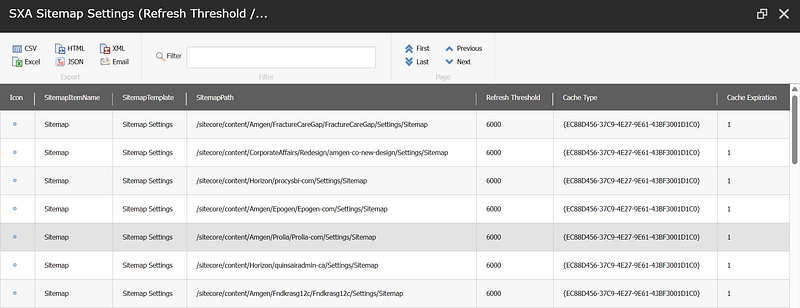
- Display results in a Show-ListView
This significantly reduced the time required to build a reliable audit script.
# -----------------------------------------
# SXA: Read Sitemap cache settings per site
# Path pattern: .../Settings/Sitemap
# -----------------------------------------

# Fields on the Sitemap item
$fieldRefreshThreshold = "Refresh Threshold"
$fieldCacheType        = "Cache Type"
$fieldCacheExpiration  = "Cache Expiration"

$results = @()

# Find all "Settings" items under /sitecore/content (fast query by name)
$settingsItems = Get-Item -Path master: -Query "fast:/sitecore/content//*[@@name='Settings']"

foreach ($settings in $settingsItems) {

    # Get child Sitemap item under Settings
    $sitemapPath = "$($settings.Paths.FullPath)/Sitemap"
    $sitemapItem = Get-Item -Path ("master:" + $sitemapPath) -ErrorAction SilentlyContinue

    if ($null -ne $sitemapItem) {
        $results += [pscustomobject]@{
            SitemapItemName       = $sitemapItem.Name
            SitemapTemplate       = $sitemapItem.TemplateName
            SitemapPath           = $sitemapItem.Paths.FullPath
            "Refresh Threshold"   = $sitemapItem[$fieldRefreshThreshold]
            "Cache Type"          = $sitemapItem[$fieldCacheType]
            "Cache Expiration"    = $sitemapItem[$fieldCacheExpiration]
        }
    }
}

# Show in list view
$results | Show-ListView `
    -Title "SXA Sitemap Settings (Refresh Threshold / Cache Type / Cache Expiration)" `
    -Property SitemapItemName, SitemapTemplate, SitemapPath, "Refresh Threshold", "Cache Type", "Cache Expiration"

Write-Host ""
Write-Host "Total Sitemap items found under Settings: $($results.Count)" -ForegroundColor Green
OutPut:
Why This Matters in Large SXA Implementations
In enterprise setups with hundreds of sites:
- Configuration drift is common
- Some sites may override defaults
- Cache misconfiguration can lead to:
- Excessive job executions
- Increased publishing pressure
- Performance degradation
Before fixing the problem, you need visibility.
Automation through SPE enables:
- Rapid environment auditing
- Cross-tenant configuration comparison
- Reliable investigation at scale
Key Takeaways
- In large multi-tenant SXA environments, manual verification does not scale.
- Structural traversal (Settings/Sitemap) is a predictable way to audit configuration.
- SPE is extremely powerful for operational investigations.
- AI-assisted scripting can accelerate development when you already understand the architecture.
Conclusion
Investigating performance issues in a 300+ site SXA environment requires structured visibility and automation.
A small PowerShell audit script can save hours of manual effort and provide precise insights needed to diagnose job behavior in environments like jobs.aspx.
If you’re managing a multi-tenant SXA solution, consider building a small internal audit toolkit using SPE — it pays off quickly.
Stay tuned for more Sitecore-related articles, tips, and tricks to enhance your Sitecore experience.
Till then, happy Sitecoring! 😊
Please leave your comments or share this article if it’s useful for you!
No comments:
Post a Comment