Tuesday, March 10, 2026

Auditing Sitemap Cache Configuration Across 300+ SXA Sites in Sitecore 10.4

Hello Sitecorian Community,

In large SXA implementations, operational issues rarely affect just one site. In our case, we were working on a Sitecore 10.4 SXA solution with 300+ websites, and we encountered a performance concern:

The sitemap refresh job was executing more frequently than expected.

To properly investigate the issue, we first needed visibility.

Specifically, we needed to answer:

  • How many sites actually have a Sitemap item?
  • What values are configured for:
  • Refresh Threshold
  • Cache Type
  • Cache Expiration
  • Are there inconsistencies across tenants and sites?

Manually checking 300+ sites was not realistic. Automation was the only viable approach.

Understanding the SXA Structure

In SXA, the typical structure looks like this:

/sitecore/content/{Tenant}/{Tenant}/{Site}/Settings/Sitemap

The configuration fields we were interested in are stored directly on the Sitemap item under the Settings node.

The required fields:

  • Refresh Threshold
  • Cache Type
  • Cache Expiration

Our goal was to extract:

  • Sitemap item path
  • Configured values of the three fields
  • Total count of sitemap items found

Approach: Automating with Sitecore PowerShell Extensions (SPE)

Instead of writing everything from scratch, I reused an existing PowerShell script that I had previously written for deleting Flashes items in an older SXA setup.

Given that we now have powerful AI-assisted tools available, I provided the reference script to ChatGPT and adapted it to:

  • Traverse all Settings nodes
  • Locate Sitemap items
  • Extract required field values
  • Display results in a Show-ListView

This significantly reduced the time required to build a reliable audit script.

Final Working Script

# -----------------------------------------
# SXA: Read Sitemap cache settings per site
# Path pattern: .../Settings/Sitemap
# -----------------------------------------

# Fields on the Sitemap item
$fieldRefreshThreshold = "Refresh Threshold"
$fieldCacheType = "Cache Type"
$fieldCacheExpiration = "Cache Expiration"

$results = @()

# Find all "Settings" items under /sitecore/content (fast query by name)
$settingsItems = Get-Item -Path master: -Query "fast:/sitecore/content//*[@@name='Settings']"

foreach ($settings in $settingsItems) {

# Get child Sitemap item under Settings
$sitemapPath = "$($settings.Paths.FullPath)/Sitemap"
$sitemapItem = Get-Item -Path ("master:" + $sitemapPath) -ErrorAction SilentlyContinue

if ($null -ne $sitemapItem) {
$results += [pscustomobject]@{
SitemapItemName = $sitemapItem.Name
SitemapTemplate = $sitemapItem.TemplateName
SitemapPath = $sitemapItem.Paths.FullPath
"Refresh Threshold" = $sitemapItem[$fieldRefreshThreshold]
"Cache Type" = $sitemapItem[$fieldCacheType]
"Cache Expiration" = $sitemapItem[$fieldCacheExpiration]
}
}
}

# Show in list view
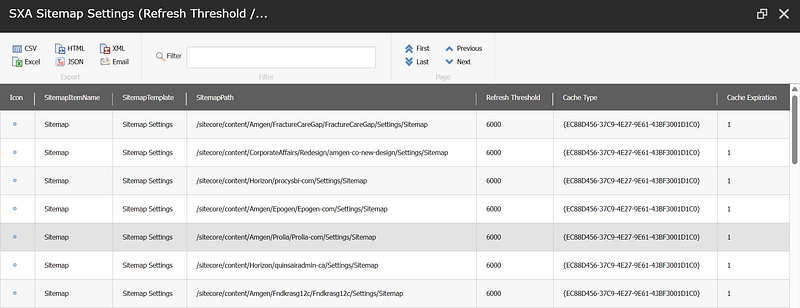
$results | Show-ListView `
-Title "SXA Sitemap Settings (Refresh Threshold / Cache Type / Cache Expiration)" `

-Property SitemapItemName, SitemapTemplate, SitemapPath, "Refresh Threshold", "Cache Type", "Cache Expiration"

Write-Host ""
Write-Host "Total Sitemap items found under Settings: $($results.Count)" -ForegroundColor Green

OutPut:

Why This Matters in Large SXA Implementations

In enterprise setups with hundreds of sites:

  • Configuration drift is common
  • Some sites may override defaults
  • Cache misconfiguration can lead to:
  • Excessive job executions
  • Increased publishing pressure
  • Performance degradation

Before fixing the problem, you need visibility.

Automation through SPE enables:

  • Rapid environment auditing
  • Cross-tenant configuration comparison
  • Reliable investigation at scale

Key Takeaways

  • In large multi-tenant SXA environments, manual verification does not scale.
  • Structural traversal (Settings/Sitemap) is a predictable way to audit configuration.
  • SPE is extremely powerful for operational investigations.
  • AI-assisted scripting can accelerate development when you already understand the architecture.

Conclusion

Investigating performance issues in a 300+ site SXA environment requires structured visibility and automation.

A small PowerShell audit script can save hours of manual effort and provide precise insights needed to diagnose job behavior in environments like jobs.aspx.

If you’re managing a multi-tenant SXA solution, consider building a small internal audit toolkit using SPE — it pays off quickly.

Stay tuned for more Sitecore-related articles, tips, and tricks to enhance your Sitecore experience.

Till then, happy Sitecoring! 😊

Please leave your comments or share this article if it’s useful for you!

Sunday, March 1, 2026

Understanding Sitecore Cache Behavior: Why Your PowerShell Updates Don't Appear (And How to Fix It Properly)

 Hello Sitecorian Community,

After 11 years architecting Sitecore solutions, I still see this question pop up regularly: “Why doesn’t my PowerShell script update show in the Content Editor until I clear cache?” It’s one of those things that trips up even experienced developers, especially when moving to containerized environments.

Let me walk you through what’s actually happening under the hood, and more importantly, how to handle it properly in enterprise implementations.

The Classic Scenario

You’re probably familiar with this pattern:

 $item = Get-Item "master:/sitecore/content/Home"
$item.Editing.BeginEdit()
$item["Title"] = "Updated via PowerShell"
$item.Editing.EndEdit()

Script executes clean. Database row updates. But Content Editor shows stale data. Refresh the browser — sometimes the new value appears, sometimes it doesn’t. Clear cache, everything’s suddenly correct.

If you’re scratching your head wondering why this happens, you’re thinking about Sitecore wrong. Let me explain.

Sitecore’s Memory-First Architecture

The key thing to understand: Sitecore is designed to avoid database calls at all costs. This isn’t a side effect — it’s the core architectural decision that lets Sitecore scale to millions of items.

Here’s what actually happens when Sitecore needs to retrieve an item:

First, check Item Cache: Sitecore looks for a fully constructed Sitecore.Data.Items.Item object in the Item Cache. If it’s there, return it immediately. Done. No further lookups needed.

If not in Item Cache, check Data Cache components: The Data Cache stores the raw building blocks:

  • ItemDefinition (ID, name, template ID, parent ID)
  • FieldList (which fields exist for this item)
  • Individual field values

If these components exist, Sitecore reconstructs the Item object from them, caches it in Item Cache, and returns it.

Finally, query the database: If the Data Cache doesn’t have what’s needed, Sitecore hits the [Items], [SharedFields], [UnversionedFields], and [VersionedFields] tables, loads the data, populates both Data Cache and Item Cache, then returns the item.

When you update an item via PowerShell, you’re writing directly to those database tables. But you’re not touching Item Cache or Data Cache. Your PowerShell script bypasses the entire ItemProvider event pipeline. No item:saved event fires. No cache invalidation events propagate. The EventQueue table doesn’t get new records. From Sitecore’s perspective, nothing changed.

The Multi-Cache Problem

This is where it gets interesting architecturally. Sitecore doesn’t have a single monolithic cache — it has multiple specialized caches that work together:

Item Cache: Stores complete Item objects (includes all fields, versions, language data)

Data Cache: Stores the raw components used to build items:

  • ItemDefinition objects
  • FieldList objects
  • Individual field values

StandardValues Cache: Stores template field default values (consulted when an item doesn’t have its own value for a field)

Path Cache: Maps item paths to GUIDs for fast lookups

AccessResult Cache: Stores security filtering results

Registry Cache: Configuration and settings

Here’s the problem: after a PowerShell update, you might have:

  • Item Cache: Contains old Item object with stale field values
  • Data Cache: Still has old field value entries
  • Path Cache: Correct (maps path to ID, which didn’t change)
  • Database: Has new values

When Sitecore retrieves your item, depending on cache state, you get inconsistent results. Two requests for the same item can return different data based on whether they hit Item Cache or rebuild from Data Cache or query the database.

I’ve debugged this with dotTrace profiler, and watching the cache hit patterns is fascinating. Here’s what actually happens:

// Request 1: Gets served from Item Cache
var item1 = Sitecore.Context.Database.GetItem(itemId);
// Returns cached Item object with old "Title" value
// Request 2: Item Cache entry was evicted, rebuilds from Data Cache
var item2 = Sitecore.Context.Database.GetItem(itemId);
// Rebuilds Item from field data, still sees old cached field values
// Request 3: Data Cache entries also evicted, hits database
var item3 = Sitecore.Context.Database.GetItem(itemId);
// Finally sees new value from database, then caches it

Why Docker Amplifies This

In traditional deployments, you might not notice this much. In containerized environments, it becomes painfully obvious. Here’s why:

Memory pressure: Containers typically run with 2–4GB RAM allocations versus 32GB+ on VMs. Cache eviction happens constantly.

Isolated process spaces: Each container has completely independent memory. CM and CD don’t share anything. In Kubernetes, you might have 3 CD replicas — each with its own cache state showing different versions of your content.

Frequent restarts: During development, containers restart constantly. Every restart = cold cache = more visible inconsistency.

No distributed cache by default: Unless you’ve implemented Redis or another distributed cache, each container is an island.

I’ve architected several Kubernetes-based Sitecore implementations, and this is where developers get bitten hard. They’ll make a PowerShell update on CM, publish it, then hit different CD pods and see different content. It’s not a bug — it’s architecture.

What Actually Happens in the UI

When you edit through Content Editor or Experience Editor, Sitecore triggers the full save pipeline through its event system. The item:saved event fires and propagates through multiple registered handlers that:

  1. Remove the item from Item Cache
  2. Clear Data Cache entries for that item ID
  3. Trigger StandardValues Cache clearing if it’s a template
  4. Add entries to the EventQueue table for remote cache invalidation across CM instances
  5. Update link database and search indexes
  6. Fire any custom event handlers you’ve registered

PowerShell’s BeginEdit()/EndEdit() methods skip all of this. They call directly into Sitecore.Data.DataProviders and write to the database. Fast, efficient, but completely bypasses the event pipeline — which means no automatic cache invalidation.

This is by design. PowerShell gives you low-level data access for performance. The trade-off is you’re responsible for cache management yourself.

Why Auto-Clearing Would Break Everything

Some developers ask: “Why doesn’t Sitecore just clear cache after every script operation?”

Think about the implications. I recently wrote a migration script that updated 50,000 items. If Sitecore cleared cache after each operation:

  • 50,000 cache clear operations
  • 50,000 cache rebuild operations on next access
  • Memory thrashing from constant allocations/deallocations
  • GC pressure from all that object churn
  • Potential OutOfMemoryException on large operations

On a production instance with millions of items, this would tank performance. Bulk operations would become impossibly slow. Memory usage would spike uncontrollably.

Sitecore’s design choice: give architects control. Want aggressive cache clearing? Do it. Want to batch updates and clear once? Do that. Want selective clearing? You got it.

The Pattern I Actually Use Now

After years of getting burned by this, here’s how I write PowerShell scripts now:

# Keep track of what I touched
$affectedItems = @()
# Do the actual updates
$items = Get - ChildItem "master:/sitecore/content/Home" - Recurse
foreach($item in $items) {
if ($item["Title"] - eq "OldValue") {
$item.Editing.BeginEdit()
$item["Title"] = "NewValue"
$item.Editing.EndEdit()
$affectedItems += $item
}
}
# Clear ONLY the items I changed
foreach($item in $affectedItems) {
[Sitecore.Data.Caching.CacheManager]::GetItemCache($item.Database).RemoveItem($item.ID)
}
# Publish to CD
foreach($item in $affectedItems) {
Publish - Item - Item $item - Target "web" - PublishMode Smart - Recurse: $false
}


This is way better than nuking all caches. You’re surgically removing just the stuff you changed. The rest of the cache stays intact, site stays fast, everyone’s happy.

Note: In most cases, clearing ItemCache alone is sufficient. DataCache entries are secondary and typically rebuild automatically. If you need more thorough cache clearing, you can add DataCache key pattern matching, but it’s rarely necessary for typical content updates.

Stuff That’s Saved Me Hours of Debugging

A few tricks I’ve picked up over the years:

Watch the EventQueue table: If you’re running multiple CMs (like in Kubernetes), check your Core database’s EventQueue table. I’ve seen situations where events just stop propagating between instances. Cache invalidation events pile up, never get processed, and suddenly different CMs show different content.

Turn on cache logging during dev: Just temporarily, because it’s chatty. But seeing exactly what’s getting cached and cleared makes everything make sense.

Use the Sitecore diagnostics tools: There’s a Support Diagnostics module that shows you what’s in cache right now. It’s like X-ray vision for understanding what’s happening.

Check Application Insights: On newer Sitecore versions, you can actually see cache hit/miss ratios. If your hit ratio is low, something’s wrong with your cache strategy.

The Publishing Thing Nobody Mentions

Here’s something that bit me hard when we went headless: clearing CM cache means nothing to your CD instances until you publish.

In the old days, some devs (not me, I swear) would point CD at the master database. Terrible practice, but it meant updates showed up everywhere immediately. In a proper architecture with separate CM/CD? Publishing isn’t optional.

And Publishing Service has its own cache quirks too. I’ve seen situations where the publishing job queue gets backed up, and suddenly your CD is minutes behind CM even though you’re publishing. Fun times.

What I Wish Someone Had Told Me Years Ago

Look, after writing probably hundreds of PowerShell scripts for Sitecore — migrations, bulk updates, automated content fixes — here’s what I’ve learned:

PowerShell changes the database, not the cache. You’re reaching under Sitecore’s hood and modifying data directly. Sitecore doesn’t know you did that unless you tell it.

Cache clearing isn’t overhead, it’s part of the job. Budget for it. Plan for it. Do it.

In real architectures, you HAVE to publish. Don’t rely on CM and CD magically staying in sync. They won’t.

Clear what you actually changed. Don’t be lazy and nuke everything unless you really need to.

Test in realistic environments. If your dev environment has unlimited memory and production doesn’t, you won’t see cache issues until it’s too late.

Once I stopped thinking of Sitecore like a traditional CMS and started understanding it’s really a memory-first system that happens to persist to a database, everything clicked. The cache isn’t misbehaving — it’s doing exactly what it’s supposed to. You just need to work with it.

These days, when a junior dev comes to me saying “my PowerShell script isn’t working,” I already know what they forgot. We all learn this lesson eventually. Hopefully, this helps you learn it a bit faster than I did.

Stay tuned for more Sitecore-related articles, tips, and tricks to enhance your Sitecore experience.

Till then, happy Sitecoring! 😊

Please leave your comments or share this article if it’s useful for you!
Thursday, February 19, 2026

Getting Started with Sitecore AI – A Practical Guide for Developers

Hello Sitecorian Community,

If you’ve been working with Sitecore for a while, you’ve probably felt it too.

The conversation around the Slack channels has completely changed. We used to talk about components, renderings, maybe debate pipeline order, or complain about xDB performance. Now? It’s all about AI-assisted content, real-time personalization, composable this, XM Cloud that.

So I wanted to take a step back and actually explain what’s going on. Not in marketing terms, but in a way that makes sense for those of us actually writing the code.

What exactly is Sitecore today? What’s this AI stuff really about? And what should we actually be learning?

That’s what this post is about.

First Things First — What IS Sitecore Anymore?

Here’s the simple version: Sitecore is a digital experience platform that helps businesses manage content and deliver personalized experiences. That part hasn’t changed.

Most of us cut our teeth on Sitecore XP — the monolithic CMS setup with xDB, MVC renderings, publishing targets, CM/CD server roles, and good old SQL databases underneath it all.

But Sitecore’s evolved. A lot.

It’s not just a CMS anymore. It’s become this composable, SaaS-first, AI-powered experience platform. And that’s not just buzzwords — it genuinely changes how we approach projects.

So What’s “Sitecore AI” Then?

When I first heard “Sitecore AI,” I figured it was just ChatGPT bolted onto the CMS. You know, like every other vendor scrambling to add AI features last year.

But it’s actually more than that.

Sitecore’s embedding AI throughout the entire experience lifecycle — from creating content to planning campaigns, personalizing experiences, and optimizing results.

The big piece of this puzzle is Sitecore Stream.

Stream is their AI orchestration layer. Think of it as the brain that connects everything. It includes AI copilots, brand-aware content generation, agent-based workflows, and campaign orchestration tools. Instead of marketers going off to use AI separately, Stream brings it right into their daily workflow inside Sitecore.

For us developers, this shifts things. We’re not just building pages anymore. We’re building intelligent workflows that do things on their own.

The Modern Sitecore Stack (Without the Marketing Fluff)

If you want to understand Sitecore AI properly, you need to know the product landscape. It’s gotten pretty fragmented honestly, but here’s how it breaks down:

XM Cloud

This is the new SaaS-based CMS. It’s headless-first, API-driven, built for modern frontend frameworks like Next.js, and runs on cloud-native infrastructure.

As a developer, you’ll focus on:

  • The rendering host (usually Next.js)
  • Layout Service
  • GraphQL APIs
  • Sitecore CLI
  • DevOps pipelines

Most new implementations are happening here. If you’re starting fresh, this is where you want to be.

Sitecore CDP (Customer Data Platform)

This is where unified customer profiles live. It handles audience segmentation and real-time data activation.

If you’re doing personalization the right way, you need to understand CDP. There’s no getting around it.

Sitecore Personalize

The real-time personalization engine. This is where decision models actually execute.

Unlike the old rule-based personalization we used to build inside XP, this works with event-driven models and APIs. You’ll work with event tracking, decisioning APIs, and edge-based execution.

What About Sitecore XP?

Yeah, I know. A lot of us are still dealing with XP in production.

And honestly? Plenty of enterprise environments — especially in India and across global enterprises — are still running it. So while everyone’s talking about AI and SaaS, XP knowledge is still valuable. Especially for migration projects, which there are going to be a lot of.

Where AI Actually Affects Us as Developers

Let me cut through the noise and talk about what this actually means for your day-to-day work.

AI impacts us in four major areas:

1. Content Assistance

Content authors can now use AI to generate drafts and variations. Our job is to support those workflows, ensure the content stays structured, and maintain governance. We need validation rules, approval processes, all that.

2. Personalization Logic

We’re moving away from static rules. Now it’s event streams, behavioral signals, and decision models doing the heavy lifting. This requires thinking in APIs, not just CMS configurations.

3. Data Engineering Awareness

With CDP in the picture, we need to understand data ingestion, identity resolution, profile unification, and event schemas. This starts looking more like data architecture than traditional CMS work. If you haven’t touched this stuff before, there’s a learning curve.

4. Extensibility with External AI

You can integrate Azure OpenAI, OpenAI APIs, or even your company’s internal ML models. You can build this into custom admin tools, content workflows, chat interfaces, campaign optimization pipelines — pretty much anywhere.

This is where you can really differentiate yourself as a developer.

How to Actually Learn This Stuff

If you’re serious about staying relevant in the Sitecore world, here’s what I’d recommend:

Start with Headless
 Get comfortable with XM Cloud architecture, the Next.js rendering host, GraphQL, Sitecore CLI, and webhooks. This is your foundation.

Then Move to Composable Architecture
 Learn the CDP data model, how Personalize decision models work, event-driven systems, and edge delivery patterns.

Finally, Explore AI Orchestration
 Understand how Sitecore Stream actually integrates AI, learn about agent-based workflows, AI governance, and brand context modeling.

You don’t need to do it all at once. But that’s the progression that makes sense.

Build Something Real

Honestly, reading documentation only gets you so far. Try building something like:

  • An AI-assisted blog creation tool inside XM Cloud
  • Dynamic hero banners that change based on Personalize decisions
  • A smart FAQ generator that pulls from your Sitecore content
  • Campaign workflow automation powered by AI
  • A chatbot that uses Sitecore’s content APIs

Practical experience beats theoretical knowledge every time.

The Mindset Shift

Here’s the thing that took me a while to realize:

We used to think: “I build components and templates.”

Now it’s: “I build experience engines powered by data and AI.”

Sitecore’s moving toward composable, SaaS, AI-orchestrated experiences. That’s the direction. And if you adapt early, you stay relevant, you start thinking like an architect, and you future-proof your career.

Honestly? This is probably the most exciting time to be in the Sitecore ecosystem. There’s a lot to learn, but that also means a lot of opportunity.

Stay tuned for more Sitecore-related articles, tips, and tricks to enhance your Sitecore experience.

Till then, happy Sitecoring! 😊

Please leave your comments or share this article if it’s useful for you!