Hello Sitecorian Community! 👋
If you have been following Sitecore community conversations lately, one acronym keeps coming up: MCP. If you have heard the term but not yet found time to dig into it properly — this four-part series is for you.
I have already written a full recap of SUGCON India 2026 in Delhi — the announcements, the sessions, the community energy. I will not repeat all of that here. But one topic from those two days sent me down a rabbit hole I haven’t climbed out of since, and that is what this series documents.
That topic was Model Context Protocol — MCP.
So what actually is MCP?
MCP — Model Context Protocol — is an open protocol that defines how AI models communicate with external tools and data sources in a structured, standardised way. The core shift it represents is this: instead of an AI assistant only being able to chat, it can also act — querying systems, reading live data, triggering operations — through a defined interface.
Think of it as a universal adapter between your AI client and any external system. The AI model discovers available tools, reads their descriptions, and calls them in response to a natural language prompt. No hardcoded API client code. No custom integration per tool. One protocol, any system that implements it.
AI ClientCopilot / Claude / CursorpromptMCP ServerTool registryRequest handlerResponse formatterresultAPI callSitecore XPItem API / GraphQLDatabasesLogs, cachesAny APIREST, GraphQL…Natural languageprompt in IDE
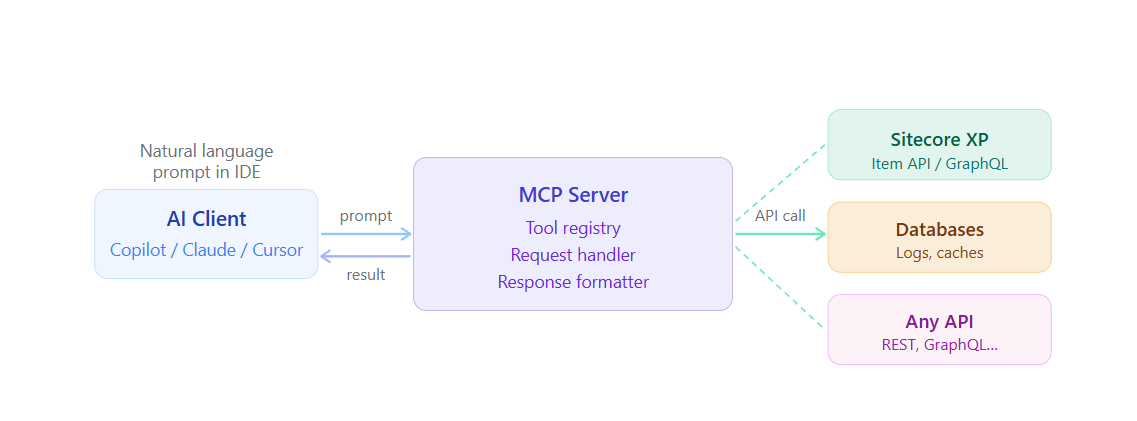
MCP high-level flow: a natural language prompt triggers the MCP client, which routes through the server to the target system and returns structured results
The three things that make MCP relevant for Sitecore developers right now
1. Sitecore’s own direction
At SUGCON India 2026, Sitecore announced Marketer MCP powered by Agent API — the ability to access Sitecore marketing capabilities directly through AI environments like Claude, Cursor, and other LLM-powered tools. This is not a roadmap item. It is Sitecore signalling that MCP is a first-class integration path.
2. The community built it first — for XP
In May 2025 — before the SUGCON announcement — community contributor Anton Tishchenko released an open-source Sitecore MCP server on GitHub: github.com/Antonytm/mcp-sitecore-server. This server connects to Sitecore XP via the Item Service API and GraphQL, and exposes tools for content operations, user and role management, index control, and database and log access. The community did not wait for an official product — it built the bridge itself.
3. The .NET angle for developers like me
Microsoft published an official quickstart for building MCP servers in C# using the C# SDK for MCP. The same language stack we use for Sitecore development is now a first-class way to build AI tooling. That alignment made experimentation feel natural rather than foreign.
What MCP actually enables — in practical terms
Without MCP, an AI assistant in your IDE can only work with the code in front of it. With an MCP server connected to your Sitecore instance, it can also:
- Browse the content tree and retrieve specific items
- Check the publishing queue without opening the Sitecore admin
- Query workflow states across a template type
- Check which items are currently locked and by whom
- Read logs and surface errors without leaving your editor
All of this through a natural language prompt. No tab-switching, no manual navigation, no copy-pasting item IDs.
Why this matters more than it sounds: Sitecore developers already know their IDE. The friction of context-switching to a browser, logging into the admin UI, navigating to the right screen — that adds up across a working day. MCP removes that friction without changing the way Sitecore works.
How MCP tools work — a closer look
Every MCP server is essentially a collection of tools. Each tool is a named function with a description and typed inputs. The AI model reads those descriptions to decide which tool to call when responding to a prompt.
MCP Server — tool anatomyTool: GetPublishingQueueStatusNameUnique identifierDescriptionAI reads this to routeInput schemaTyped parametersExecution logicCalls Sitecore APIsAI Modelreads descriptionSitecore XPreturns live data
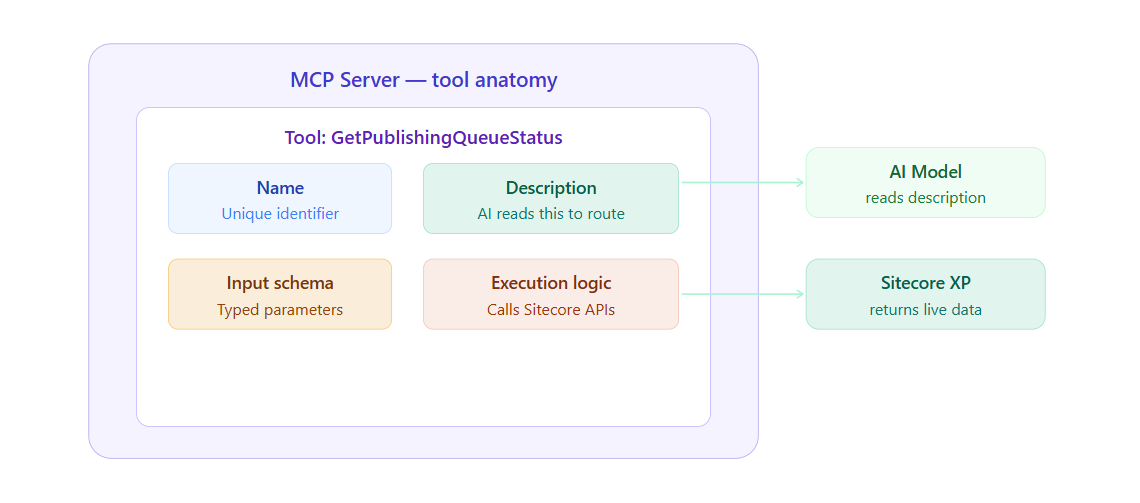
Anatomy of a single MCP tool. The AI reads the description to decide whether to call the tool; the execution logic does the actual work against Sitecore
What is coming in this series
BlogWhat it coversBlog 1 (this one)What MCP is, why it matters for Sitecore developers, and the landscapeBlog 2Building a minimal MCP server in .NET using Microsoft’s official C# quickstartBlog 3Setting up Anton Tishchenko’s community Sitecore MCP server for XP with VSCode and CopilotBlog 4Building a custom .NET MCP server tailored to real Sitecore project reporting needs
If you are a .NET developer working on Sitecore and curious about where AI tooling is heading — stick around. The barrier is genuinely lower than it looks.
Till then, Happy Sitecoring! 😊
No comments:
Post a Comment